
Prepared — Historical Related Incidents
Product: Prepared Platform
Audience: Call Takers, Dispatchers, Supervisors, Administrators
Last Updated: 08/20/2025
Support Contact: Support@prepared911.com
Outcome Statement
By the end of this training, you will:
Use the Historical Related Incidents panel during a call to find prior incidents by phone number or address.
Interpret matches (exact vs. approximate), triage multiple results, and apply the information to your questioning and dispatch notes.
Reduce duplicates, tailor questions for frequent callers, and share relevant context with responders.
Provide feedback on match quality and troubleshoot common issues.
Overview (Why you use this)
You use Historical Related Incidents to see whether a current call relates to past activity. The feature:
Runs automatically within ~5 seconds of receiving a phone number or address.
Surfaces phone (exact) and address (exact or approximate ~500 ft) matches from ongoing and historical calls.
Shows results in a collapsible panel, ordered by most recent; the first result opens by default.
Lets you rate match quality with thumbs up/down to improve accuracy over time.
You benefit because you skip manual “check priors,” ask better questions sooner, consolidate duplicates, and brief responders with context that matters.
Prerequisites
You are signed in to the Prepared Platform and can open an Incident.
You know your agency's policies for repeat callers, sensitive locations (e.g., shelters), and information sharing.
You know where to enter dispatch notes and how to notify responders per local SOP.
Safety, Privacy, and Good Judgment (Read before you start)
Share only what’s relevant to responder safety and call handling.
Be cautious with multi-unit addresses (apartments, shelters, nursing homes) where false positives are more likely.
Do not delay life-safety actions while reviewing history. If seconds matter, act first, then reference history.
How-To Guides (Step by Step)
1) Open and Scan the Historical Incidents Panel
Open the Incident for the active call.
Locate the Historical Incidents panel.
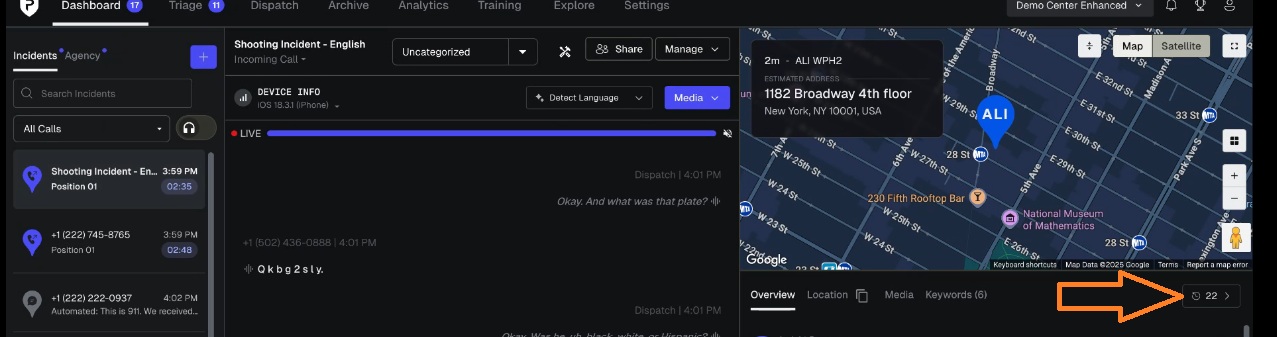
Wait up to 5 seconds for automatic results after phone/address entry.
Confirm the first result has opened and note the match type and timestamp.
If the panel is collapsed, expand it to view all results.
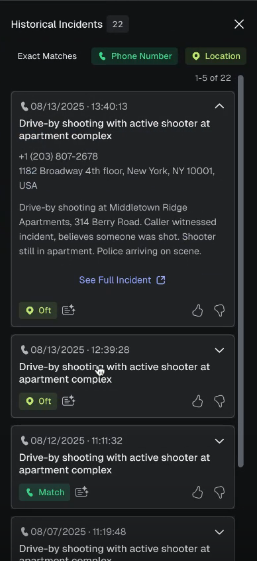
Tip: If you do not see results by 5–8 seconds, follow the troubleshooting guide below.
2) Interpret a Phone-Number Match (exact)
Look for the Phone Match label.
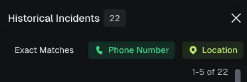
Confirm the number displayed exactly matches the current caller.
Check recency (timestamp) and call type.
Skim the summary preview for relevance (e.g., domestic, welfare check, medical).
Decide whether to adjust your questioning (see Guide 5) or brief responders (see Guide 7).
Note: Use extra care with shared phones (family devices, workplace lines).
3) Interpret a Location Match (exact or ~500 ft)
Look for the Address Match label and the displayed distance.
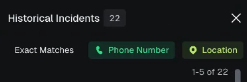
If exact, treat as the same address; if ~500 ft, think nearby property/neighbor.
Check unit numbers and landmarks when available.
Use the summary preview to confirm relevance (e.g., prior noise complaint vs. prior violence).
If likely relevant, incorporate into questioning and responder brief.
Caution: In apartments, multiple unrelated calls can share the same street address—verify unit and context.
4) Triage Many Results Quickly
Scan top-to-bottom (most recent at top).
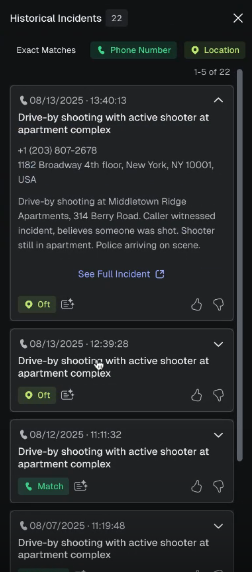
Shortlist up to three most relevant incidents based on recency + similar call type.
Ignore older or off-type incidents unless the current situation suggests a pattern (e.g., escalating disputes).
Open shortlisted items to read full preview(s) only as needed.
Goal: Spend ≤15 seconds deciding what matters for this call.
5) Use History to Tailor Your Questioning
If prior domestic or violence is shown, ask safety-focused questions early.
“Has anyone made threats or used weapons today?”
If the caller is a frequent caller, shorten the intake and target likely needs.
“You’ve reached us before about [issue]. What’s different today?”
If previous calls show medical patterns, screen early.
“Are you having the same chest pain as last week or something new?”
Document only relevant historical context in notes per agency policy.
6) Consolidate Likely Duplicates
If multiple incidents show similar time, location, or subject, treat them as potential duplicates.
Follow your CAD/records procedure to link or note duplicates.
In your notes, add: “Possible duplicate—see Historical Incidents [timestamp].”
Avoid creating new incidents when a current one already covers it (per policy).
7) Share Critical Context with Responders
Confirm relevance (do not overload).
Use clear, brief radio language:
“Unit 21: Prior DV at this address last month; no weapons then, unknown today.”“Medic 3: Frequent fall risk per prior calls; patient may be diabetic.”
Add a single line in dispatch notes summarizing only what helps safety and decision-making.
Update if new history becomes relevant during the call.
8) Give Feedback on Match Quality
For a useful match, click 👍 (thumbs up).
For an irrelevant or misleading match, click 👎 (thumbs down).
If your policy allows, briefly note “False positive—multi-unit building” or similar in internal comments.
9) Handle Likely False Positives
Check for multi-unit addresses and facilities (apartments, shelters, nursing homes).
Compare call types (past noise complaint vs. current medical).
Use distance for near-matches (~500 ft) to decide if it could be a neighbor.
If uncertain, do not rely on the match—proceed with standard questioning.
10) Troubleshoot Missing or Slow Results
Confirm phone or address fields are entered correctly.
Wait up to 8 seconds if the network is slow.
Refresh the panel (collapse/expand) if needed.
If still missing, continue your call and report the issue per local process; add a brief note: “Historical panel did not load.”
11) Document What You Used (Good Notes)
Add only relevant historical details that affect care, officer safety, or call handling.
Use neutral, factual language (avoid labels like “frequent flyer”).
Keep it brief: “History shows prior welfare checks; no previous violence.”
Practice Scenarios (Apply It Step by Step)
Scenario A — Repeat Caller (Non-Emergent)
You see phone exact matches: 7 calls in the last week for the same complaint.
Do this:
Confirm today’s need.
Shorten intake based on pattern.
Provide resources per policy.
Note: “History: repeat caller; same complaint; resources provided.”
Scenario B — Domestic Dispute Potential
You see exact address matches: prior domestic disturbance last month.
Do this:
Ask safety questions first.
Flag history to responders succinctly.
Keep the caller on the line as needed.
Note: “Prior DV at same address; safety questions completed.”
Scenario C — Neighbor Dispute (~300 ft)
You see address match ~300 ft away; prior noise complaint.
Do this:
Clarify the exact location/unit.
Ask if the dispute involves the same neighbors.
Brief responders only if relevant.
Note: “Near match (~300 ft); context likely adjacent unit.”
Scenario D — Medical Frequent Caller
You see phone exact matches with prior diabetic emergencies.
Do this:
Screen for hypo/hyperglycemia quickly.
Advise responders of history if relevant.
Note: “Frequent medical calls; similar presentation.”
Scenario E — Facility Address (High Volume)
You see many matches at a nursing home address.
Do this:
Verify patient name/room to avoid confusion.
Use only relevant prior info (e.g., known DNR on file per policy).
Avoid assuming current complaint = prior complaint.
Quick Decision Aid (Text-Based Flow)
Is the match type relevant?
Phone exact → likely relevant → scan last 2–3 incidents.
Address exact → likely relevant → check unit.
Address ~500 ft → maybe → verify neighbor/context.Will this change what you ask or what you send?
Yes → brief responders + note succinctly.
No → move on; don’t overload the air.
Uncertain or conflicting info?
Default to standard protocol; mark the match as 👎 if misleading.
Best Practices You Should Adopt
Check early, act fast: Glance at the panel as soon as you have phone/address.
Triage ruthlessly: Focus on recency and same-type incidents.
Think safety: If prior violence/weapons exist, lead with safety questions.
Keep notes short: One line of relevant context beats a paragraph.
Use feedback: Thumbs up/down to help improve future accuracy.