
Agency
This guide explains what each visible setting does and when your agency would use it.
ACT setting: Agency
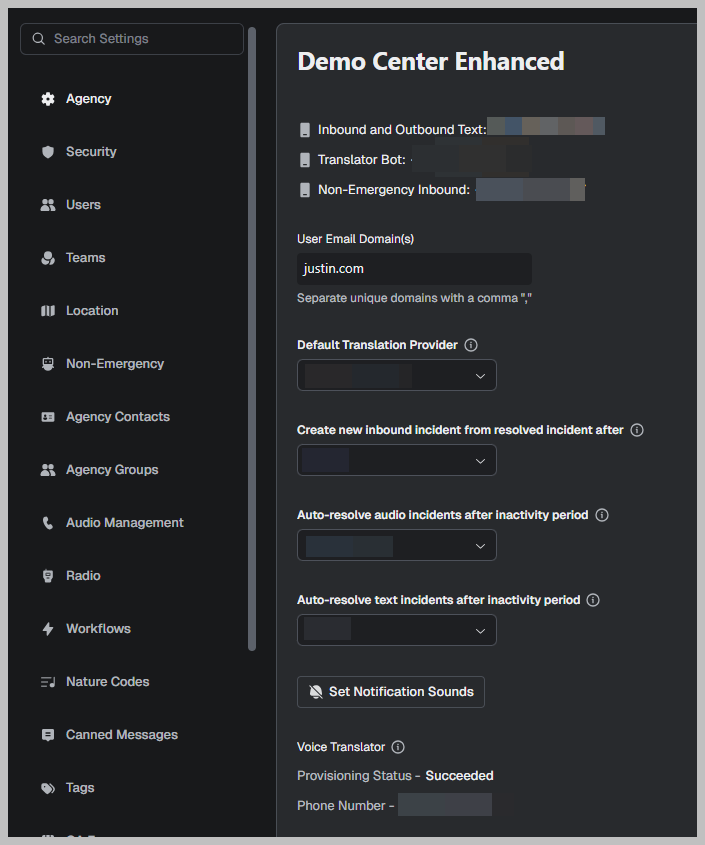
Even though the page title says Demo Center, the controls shown here map to a real ACT tenant configuration.
Inbound and Outbound Text: +1 (###) ###-####
Function
The phone number used for SMS/Text-to-911 style messaging workflows in the tenant.
Usage
Use this number for inbound texting (if enabled) and for sending outbound texts from ACT, depending on your center’s messaging setup.
Best practices
Use a consistent number, so callers recognize it.
If you change this number, review Canned Messages and any Workflows that send texts.
Translator Bot: +1 (###) ###-####
Function
A dedicated number used for the translation bot workflow (how translation is invoked/bridged for messaging or translation services, depending on configuration).
Usage
Use this when translation features are enabled, and you want a consistent translation pathway that staff can rely on.
Best practices
Standardize the process across shifts (don’t let translation become “tribal knowledge”).
Confirm the Default Translation Provider matches policy.
Non-Emergency Inbound: +1 (###) ###-####
Function
The inbound number for non-emergency call handling/routing that ties into ACT workflows (often relevant when non-emergency handling is configured alongside ACT).
Usage
Route non-emergency inbound traffic to this number when you use a separate path for non-emergency intake.
Best practices
Keep non-emergency routing separate if your policy requires different handling, staffing, or reporting.
Validate that staff know which line they’re working (911 vs non-emergency).
User Email Domain(s)
Function
A restriction/allowlist for what email domains can be used for user accounts (or for auto-provisioning rules, depending on how the tenant is set up).
Usage
Add your agency domain(s) (for example, county.gov) so that access is limited to approved email addresses.
Best practices
Add all legitimate domains your agency uses (county + city + contracted partners if approved).
If you use SSO, make sure the email domain aligns with your identity provider’s user identities.
Default Translation Provider
Function
Selects which translation engine ACT uses by default (example shown: Google Translate).
Usage
Set the provider your center has approved so translation behavior is consistent across users.
Best practices
Treat this as a governance setting: choose one default and keep it stable unless policy changes.
If you change providers, validate translation quality on common scenarios.
Create a new inbound incident from a resolved incident after
Function
Controls whether a new inbound contact/message should create a new incident if the previous incident was already resolved, and after what time threshold.
Usage
Set to Never if you want follow-up messages to stay attached to the original incident.
Set a time threshold if you want a clean break between separate conversations.
Best practices
Use a threshold if you see “old incidents reopening forever,” and it hurts reporting or review.
Keep thresholds aligned with your operational expectations (how long a “single conversation” typically lasts).